Search This Blog

Thursday, May 25, 2017

Oracle Apps R12 Creating customers as Person

Creating customers as Person:
  1. Custom table.
  2. Upload using plsql tool, so Arabic will be uploaded correctly.
  3. Insert data into interface tables.
  4. Run the concurrent program.’ Customer Interface’
1.
CREATE TABLE APPS.XXFUJ_CUST_UPLOAD
(
 SNO                  NUMBER,
 CUST_NUMBER          VARCHAR2(18 BYTE),
 OU_ID                NUMBER,                  
 OU_NAME              VARCHAR2(200 BYTE), --OPTIONAL
 CUST_NAME_ENG        VARCHAR2(2000 BYTE), --OPTIONAL
 CUST_FIRST_NAME_AR   VARCHAR2(200 BYTE),
 CUST_SECOND_NAME_AR  VARCHAR2(200 BYTE), --OPTIONAL
 CUST_LAST_NAME_AR    VARCHAR2(200 BYTE),
 CUST_ADDR1           VARCHAR2(240 BYTE),
 CUST_ADDR2           VARCHAR2(240 BYTE),
 CUST_CITY            VARCHAR2(240 BYTE),
 CUST_GENDER          VARCHAR2(240 BYTE),
 FUTURE1              VARCHAR2(240 BYTE), --OPTIONAL
 FUTURE2              VARCHAR2(240 BYTE), --OPTIONAL
 FUTURE3              VARCHAR2(240 BYTE), --OPTIONAL
 FUTURE4              VARCHAR2(240 BYTE), --OPTIONAL
 FUTURE5              VARCHAR2(240 BYTE   --OPTIONAL
)

2.
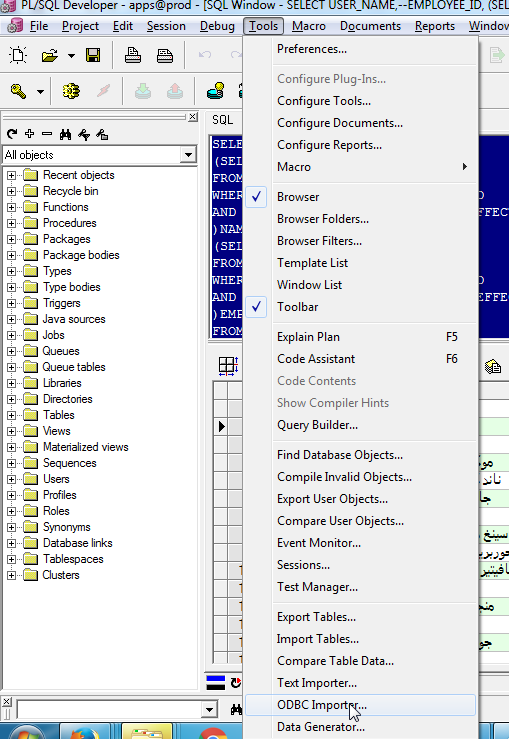
Chk the screen shots below.
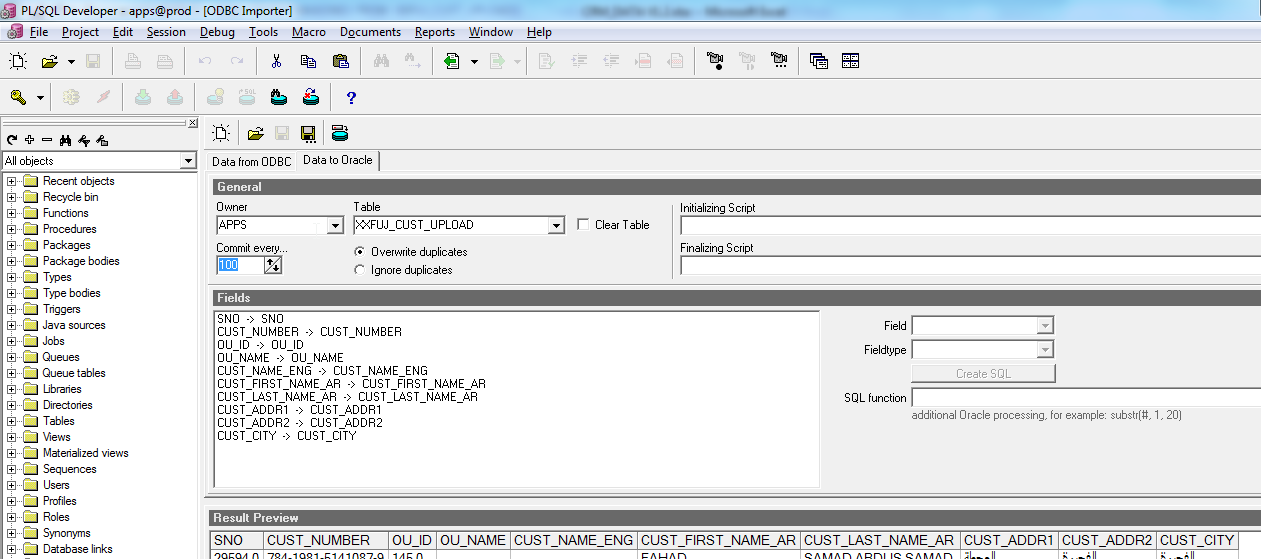
Plsql developer>tools>ODBC Importer

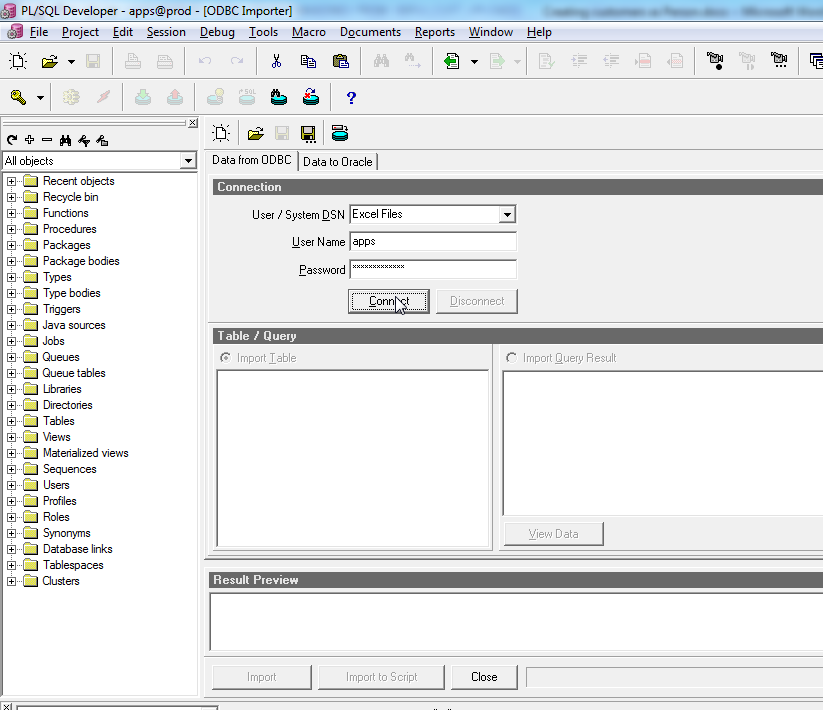
Data from ODBC Tab>
Connection:
Excel files –if you don’t see Excel Files then you need to chk other version of plsql dev.
Apps
Apps
>connect
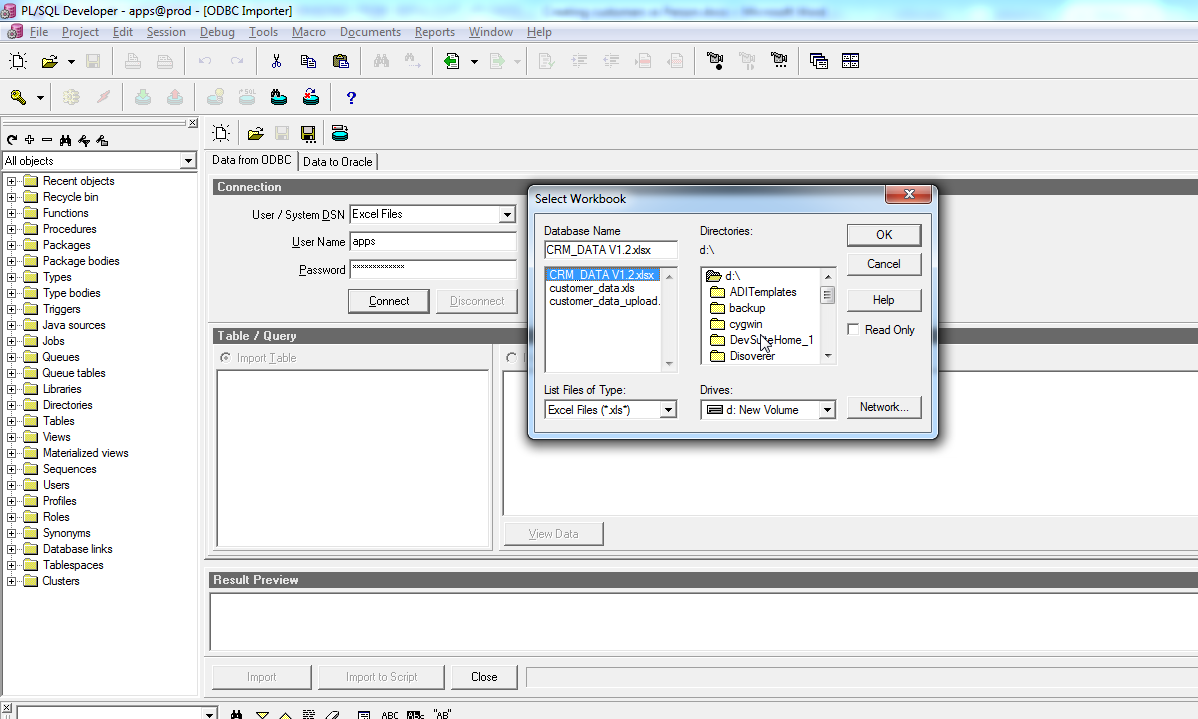
>select the excel file
>Table/Query : select the sheet

Data to Oracle >Tab
General:
Apps
XXFUJ_CUST_UPLOAD –table
Please be sure that excel column names are similar to the table column names, else you can map here.

Click Import.
Pls chk below for screenshots.


3. Interface tables:

  1. ar.RA_CUSTOMERS_INTERFACE_ALL
  2. ar.ra_customer_profiles_int_all

I am uploading only customer info and address, so using only above 2 interfaces, for other info to upload, chk the other interface tables.

Creating sequences:
  1. CREATE SEQUENCE APPS.FUJ_CUST_S
 START WITH 29595
 MAXVALUE 9999999
 MINVALUE 1
 NOCYCLE
 NOCACHE
 NOORDER;

  1. CREATE SEQUENCE APPS.FUJ_CUST_ADD_S
 START WITH 29595
 MAXVALUE 99999999
 MINVALUE 1
 NOCYCLE
 NOCACHE
 NOORDER;

Insert custom table data into interface tables:


--TRUNCATE TABLE ar.ra_customer_profiles_int_all


--
  -- Insert record into customer interface table
  --
  
  DECLARE
  CURSOR C1 IS
  
  SELECT * FROM XXFUJ_CUST_UPLOAD
  WHERE  SNO BETWEEN 29594 AND 300000;
  
  
  BEGIN
  FOR I IN C1 LOOP
  INSERT into ar.RA_CUSTOMERS_INTERFACE_ALL
  ( ADDRESS1    
  , ADDRESS2                                                         
  , ORIG_SYSTEM_CUSTOMER_REF               
  , ORIG_SYSTEM_ADDRESS_REF                
  , SITE_USE_CODE                          
  , INSERT_UPDATE_FLAG                     
  , CUSTOMER_NAME                          
  , CUSTOMER_NUMBER                        
  , PERSON_FLAG                                                 
  , CUSTOMER_STATUS                        
  , PRIMARY_SITE_USE_FLAG                  
  , CITY                                   
 -- , STATE                                                                
 -- , POSTAL_CODE                            
  , COUNTRY                                
  --, COUNTY                  
  --, JGZZ_FISCAL_CODE                                                           
  , ORG_ID                                 
  , LAST_UPDATE_DATE       
  , LAST_UPDATED_BY        
  , CREATION_DATE          
  , CREATED_BY         
  , PERSON_FIRST_NAME
  , PERSON_LAST_NAME                      
  )
  VALUES
  ( I.CUST_ADDR1  -- ADDRESS1                                                             
  , I.CUST_ADDR2  -- ADDRESS2
  , 'FUJ_CUST'||'-'||FUJ_CUST_S.NEXTVAL      -- ORIG_SYSTEM_CUSTOMER_REF               
  , 'FUJ_CUST'||'-'||FUJ_CUST_ADD_S.NEXTVAL     -- ORIG_SYSTEM_ADDRESS_REF                
  , 'BILL_TO'          -- SITE_USE_CODE                          
  , 'I'                -- INSERT_UPDATE_FLAG                     
  , I.CUST_FIRST_NAME_AR      -- CUSTOMER_NAME                          
  , I.CUST_NUMBER           -- CUSTOMER_NUMBER                        
  , 'Y'                -- PERSON_FLAG                                    
  , 'A'                -- CUSTOMER_STATUS                        
  , 'Y'                -- PRIMARY_SITE_USE_FLAG                  
  , I.CUST_CITY           -- CITY                                   
 -- , 'MN'               -- STATE                                                   
 -- , 55400              -- POSTAL_CODE                            
  , 'AE'               -- COUNTRY                                
  --, 'SCOTT'            -- COUNTY                   
  --, '21-3456789'       -- JGZZ_FISCAL_CODE                                     
  , 145                  -- ORG_ID                                 
  , SYSDATE            -- LAST_UPDATE_DATE       
  , 2605               -- LAST_UPDATED_BY        
  , SYSDATE            -- CREATION_DATE          
  , 2605               -- CREATED_BY
  , I.CUST_FIRST_NAME_AR
  , I.CUST_LAST_NAME_AR                               
  )
;

/*if u need ship_to also, then copy the above insert code twice and change the BILL_TO to SHIP_TO  and change the sequence NEXTVAL to CURRVAL for SHIP_TO */
  --
  -- Insert records inot profile interface table
  --
  INSERT into ar.ra_customer_profiles_int_all
  ( ORIG_SYSTEM_CUSTOMER_REF             
  , INSERT_UPDATE_FLAG             
  , ORG_ID          
  , CREDIT_HOLD                       
  , CUSTOMER_PROFILE_CLASS_NAME
  , LAST_UPDATE_DATE       
  , LAST_UPDATED_BY        
  , CREATION_DATE          
  , CREATED_BY                               
  )
  VALUES
  ( 'FUJ_CUST'||'-'||FUJ_CUST_S.CURRVAL  -- ORIG_SYSTEM_CUSTOMER_REF             
  , 'I'            -- INSERT_UPDATE_FLAG             
  , 145              -- ORG_ID          
  , 'N'            -- CREDIT_HOLD                       
  , 'DEFAULT'      -- CUSTOMER_PROFILE_CLASS_NAME
  , SYSDATE        -- LAST_UPDATE_DATE               
  , 2605           -- LAST_UPDATED_BY                
  , SYSDATE        -- CREATION_DATE                  
  , 2605           -- CREATED_BY                                                 
  )
;
END LOOP;
COMMIT;
END;
/

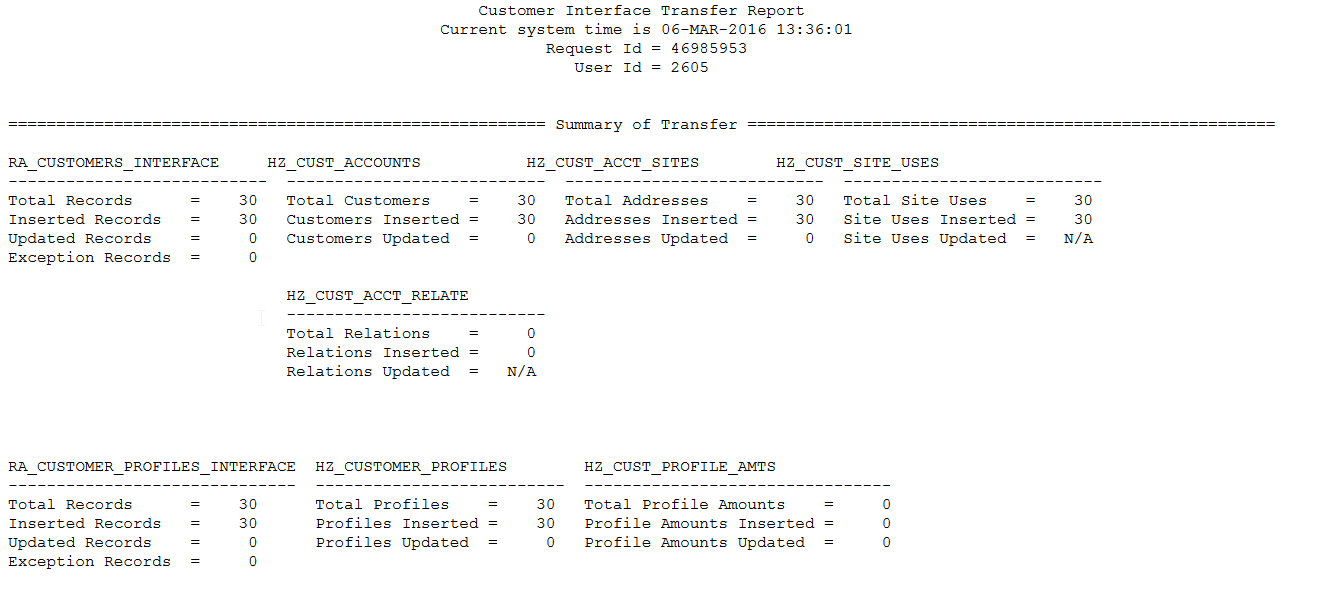
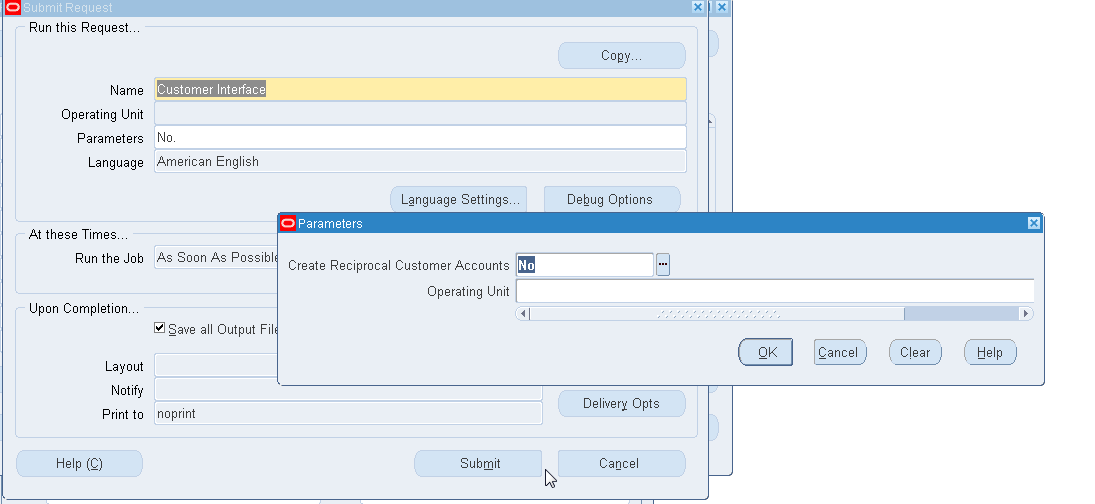
4.. Running the concurrent program:” Customer Interface”
C:\Users\egov\Desktop\customer7.png

C:\Users\egov\Desktop\customer8.png

C:\Users\egov\Desktop\customer1.png

C:\Users\egov\Desktop\customer2.png

C:\Users\egov\Desktop\customer3.png

C:\Users\egov\Desktop\customer4.png

C:\Users\egov\Desktop\customer5.png

C:\Users\egov\Desktop\customer6.png


Errors and solutions:

Check the log file of the Concurrent program for details of errors and update the interface tables accordingly.

Once uploaded data from the interface tables, will be deleted automatically from the interface tables.

So the records in the interface tables are not-uploaded data - data with error for sure.


Sunday, May 14, 2017

Oracle Apps R12 to check the COA(Chart of Accounts) with description

SELECT GCC.CODE_COMBINATION_ID,
       GCC.SEGMENT1,
       GCC.SEGMENT2,
       GCC.SEGMENT3,
       GCC.SEGMENT4,
       GCC.SEGMENT5,
       GCC.SEGMENT6,
       GCC.SEGMENT7,
       SUBSTR (
          APPS.GL_FLEXFIELDS_PKG.GET_DESCRIPTION_SQL (
             GCC.CHART_OF_ACCOUNTS_ID,
             1,
             GCC.SEGMENT1),
          1,
          40)
          SEGMENT1_DESC,
       SUBSTR (
          APPS.GL_FLEXFIELDS_PKG.GET_DESCRIPTION_SQL (
             GCC.CHART_OF_ACCOUNTS_ID,
             2,
             GCC.SEGMENT2),
          1,
          40)
          SEGMENT2_DESC,
          SUBSTR (
          APPS.GL_FLEXFIELDS_PKG.GET_DESCRIPTION_SQL (
             GCC.CHART_OF_ACCOUNTS_ID,
             3,
             GCC.SEGMENT3),
          1,
          40)
          SEGMENT3_DESC,
          SUBSTR (
          APPS.GL_FLEXFIELDS_PKG.GET_DESCRIPTION_SQL (
             GCC.CHART_OF_ACCOUNTS_ID,
             4,
             GCC.SEGMENT4),
          1,
          40)
          SEGMENT4_DESC,
       SUBSTR (
          APPS.GL_FLEXFIELDS_PKG.GET_DESCRIPTION_SQL (
             GCC.CHART_OF_ACCOUNTS_ID,
             5,
             GCC.SEGMENT5),
          1,
          40)
          SEGMENT5_DESC,
SUBSTR (
          APPS.GL_FLEXFIELDS_PKG.GET_DESCRIPTION_SQL (
             GCC.CHART_OF_ACCOUNTS_ID,
             6,
             GCC.SEGMENT6),
          1,
          40)
          SEGMENT6_DESC,
       SUBSTR (
          APPS.GL_FLEXFIELDS_PKG.GET_DESCRIPTION_SQL (
             GCC.CHART_OF_ACCOUNTS_ID,
             7,
             GCC.SEGMENT7),
          1,
          40)
          SEGMENT7_DESC,
       GCC.CHART_OF_ACCOUNTS_ID CHART_OF_ACCOUNTS_ID,
       GCC.ACCOUNT_TYPE
  FROM GL_CODE_COMBINATIONS GCC
 --WHERE CODE_COMBINATION_ID = 3000

Thursday, May 11, 2017

Barcode in Oracle Apps R12 XML Reports

Barcode in Oracle Apps R12 XML Reports

1. Make the report all same as normal XML Report.
2. In the template rtf, just change the field font to 'IDAutomationHC39M'
3. And check the field should be character, in my report, we used the id_number (number datatype) field with concat as below.
'('||id_number||')'

Tuesday, April 11, 2017

Oracle SSHR R12 supervisor is in the Approval Group in the next level, then skip the Approval Group.


FUNCTION TYR_GET_HR_ROLE(p_transaction_id IN NUMBER, P_ROLE_NAME IN VARCHAR2
)
---case when supervisor is in the role of approver users in the next level, then skip the role approval, as already the supervisor approved it.
RETURN VARCHAR2
AS
L_person_id NUMBER(10);
L_selected_person_id hr_api_transactions.selected_person_id%TYPE;
L_creator_person_id hr_api_transactions.creator_person_id%TYPE;
l_business_group_id NUMBER;
BEGIN
fnd_profile.get ('PER_BUSINESS_GROUP_ID', l_business_group_id);
BEGIN
SELECT selected_person_id,creator_person_id
INTO L_selected_person_id,L_creator_person_id
FROM hr_api_transactions
WHERE transaction_id = p_transaction_id;
EXCEPTION
WHEN OTHERS THEN
RETURN NULL;
END;

BEGIN

select ppf.PERSON_ID
INTO l_person_id
from pqh_roles PR, per_people_extra_info pei, per_all_people_f ppf, fnd_user usr
where pei.PEI_INFORMATION3 = to_char(pr.role_id)
and ppf.person_id = pei.PERSON_ID
and usr.EMPLOYEE_ID = ppf.PERSON_ID
and sysdate between ppf.EFFECTIVE_START_DATE and ppf.EFFECTIVE_END_DATE
and pr.role_name= P_ROLE_NAME
and pei.INFORMATION_TYPE='PQH_ROLE_USERS'
and ppf.PERSON_ID <> (SELECT selected_person_id FROM hr_api_transactions WHERE transaction_id = p_transaction_id)
and ppf.PERSON_ID <> (SELECT nvl(paaf.supervisor_id,0) FROM per_all_assignments_f paaf
WHERE paaf.person_id=(SELECT selected_person_id FROM hr_api_transactions WHERE transaction_id = p_transaction_id)
AND TRUNC(SYSDATE) BETWEEN paaf.effective_start_date AND paaf.effective_end_date
AND PRIMARY_FLAG = 'Y');

EXCEPTION
WHEN NO_DATA_FOUND THEN
l_person_id :=null;
END;
IF (L_selected_person_id = L_person_id) OR (l_creator_person_id = l_person_id) THEN
RETURN NULL;
ELSE
RETURN 'PER:'||to_char(L_person_id);
END IF;
EXCEPTION
WHEN OTHERS THEN
RETURN NULL;
END TYR_GET_HR_ROLE;


Sunday, April 9, 2017

Oracle Apps R12 SSHR Custom Notification Requirement to add Empno and Leave Name in the Notification Subject sent to the approver:

Requirement to add Empno and Leave Name in the Notification Subject sent to the approver:

  1. Create package in database XXZAMEL_WF_SS.

Code of package is at the end of the post.

  1. Identify the item_Key , message_name from the below query.
select item_key,message_name from wf_notifications
WHERE NOTIFICATION_ID = 9589048

Notification Message Name: HR_EMBD_NTFY_APPROVAL_FWD_MSG
Approval Message Name: HR_EMBED_RN_NTF_APPR_MSG

  1. Get the process name from the below query.
select process_name, TRANSACTION_ID from hr_api_transactions where item_key = :item_key_step2

HR_GENERIC_APPROVAL_PRC

  1. Open the workflow builder, and then open the process name mentioned in step3.

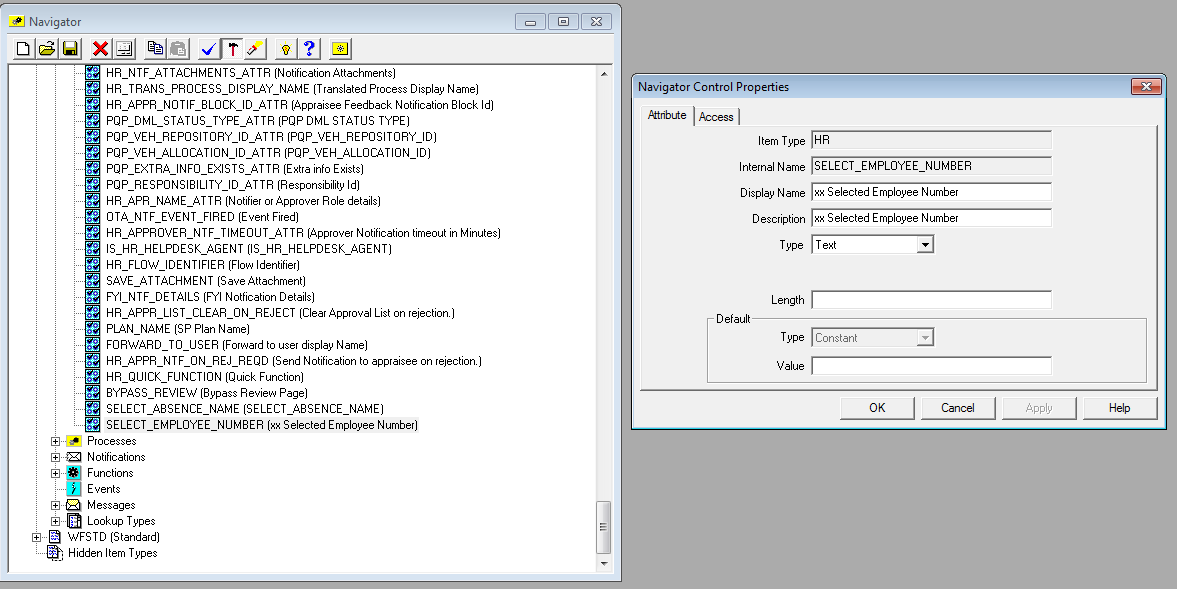
  1. Create 2 attributes under Attributes.
  1. SELECT_ABSENCE_NAME
  2. SELECT_EMPLOYEE_NUMBER


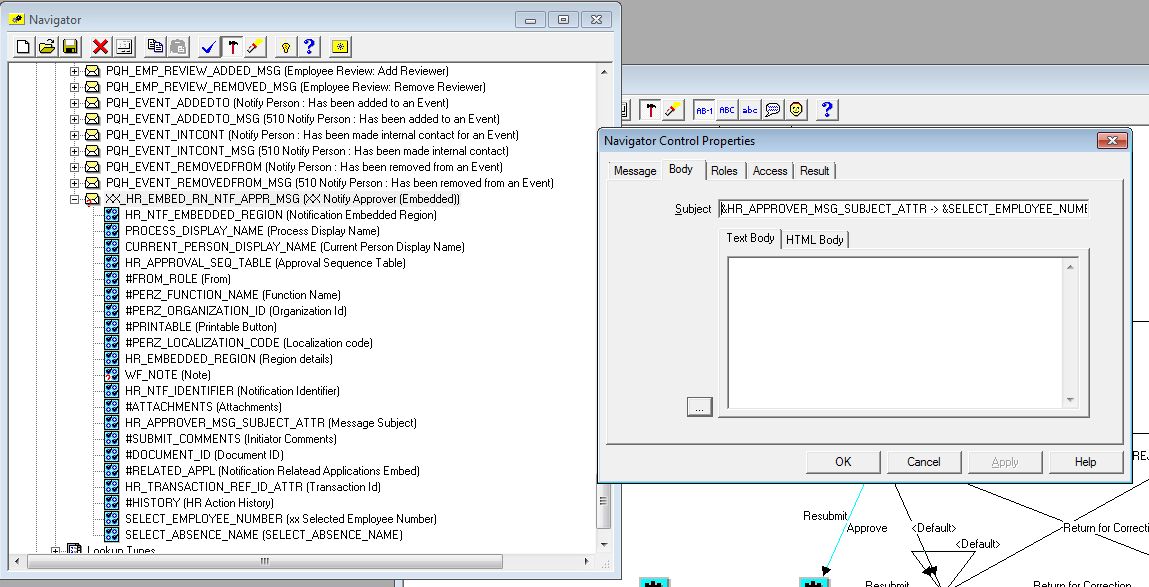
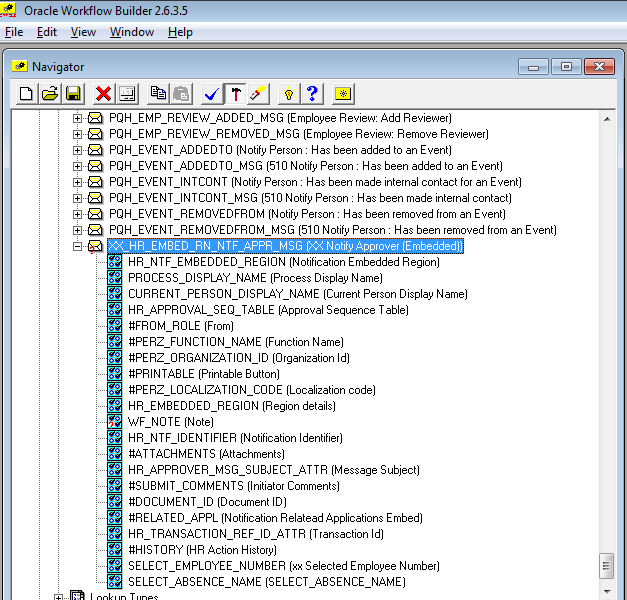
  1. Copy(right click copy) Under Messages ‘HR_EMBED_RN_NTF_APPR_MSG’
and paste (right click paste) with new name as ‘XX_HR_EMBED_RN_NTF_APPR_MSG’

Open the properties of Message and in Body Subject add our new attributes as below.
&HR_APPROVER_MSG_SUBJECT_ATTR -> &SELECT_EMPLOYEE_NUMBER -> &SELECT_ABSENCE_NAME


  1. Copy/drag the new 2 attributes created in step 5, paste/drag under the new message created in step6.

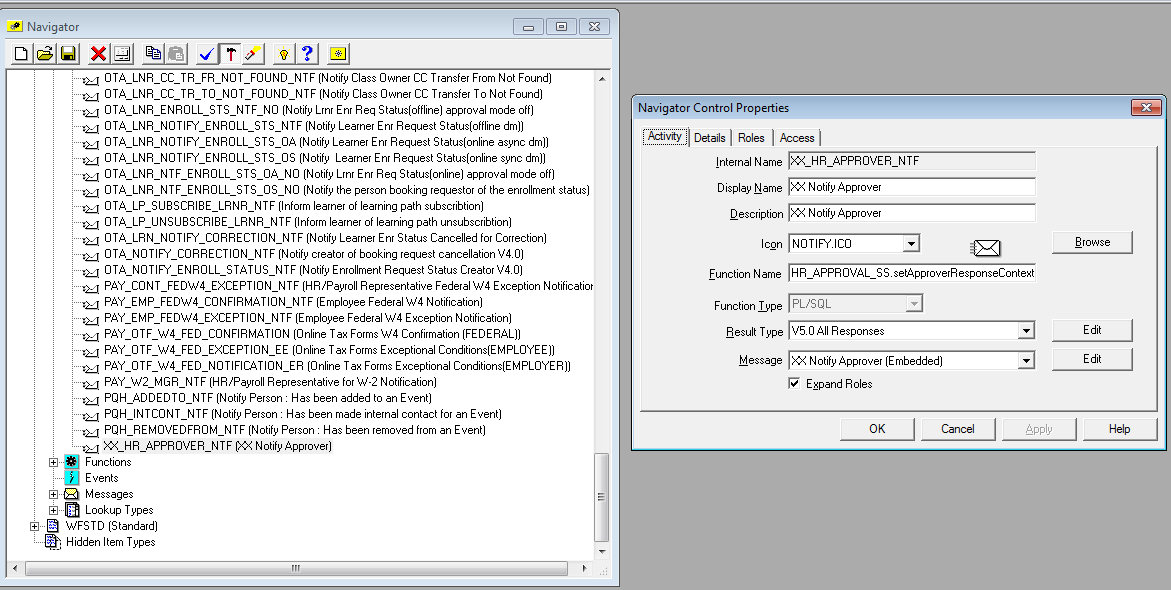
  1. Copy the notification ‘HR_APPROVER_NTF’ paste it with the new name ‘XX_HR_APPROVER_NTF’.
In the properties of Notification change the message to our new custom message created in step7.

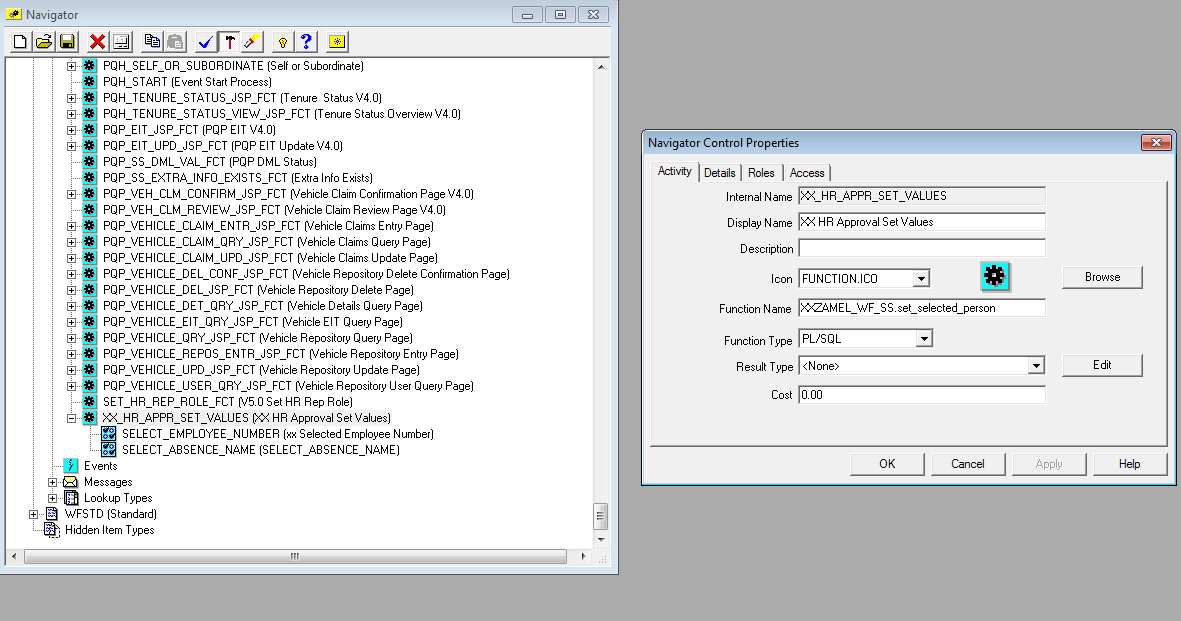
  1. Under Functions, create new function internal name as ‘XX_HR_APPR_SET_VALUES’, drag/paste the 2 new attributes under the new function as shown below.
Function Name:  give the package.procedure which we created in step1.
XXZAMEL_WF_SS.set_selected_person

  1. Open the process ‘HR_APPROVAL_NTF_PRC’


Take the screenshot and save it, as we will delete the HR_APPROVER_NTF message selected in the above image.

Once deleted, drag the XX_ HR_APPROVER_NTF notification and connect the same as before.


The blue lines shows the connectivity is done twice, Example: Resubmit and then again Approve.
Don’t worry about the function, we are going to add in the next step.

  1. Drag the custom function we created between new notification and OR function as below shown.


11.2

Open the properties of our Notification and go to the Node Tab.
Performer Type: ItemAttribtue
                 Value: Forward to Username


  1. Save and test the solution.


dfd

Package code:


/*--------------------------------------- (XXZAMEL_WF_SS) Package ------------------------------------------------*/
CREATE OR REPLACE package APPS.XXZAMEL_WF_SS as

procedure set_selected_person(itemtype  in     varchar2
                              ,itemkey  in     varchar2
                              ,actid    in     number
                              ,funmode  in     varchar2
                              ,result      out nocopy varchar2) ;


end;
/

/*----------------------------------------- Package Body -------------------------------------*/
/*--------------------------------------------------------------------------------------------*/

CREATE OR REPLACE package body APPS.XXZAMEL_WF_SS as

---- preocedue set_selected_function gets the selected person in HRSS as per transaction_id from hr_api_transactions table
-- created by HNasr 0ctober-2015

procedure set_selected_person(itemtype  in     varchar2
                              ,itemkey  in     varchar2
                              ,actid    in     number
                              ,funmode  in     varchar2
                              ,result      out nocopy varchar2)
is
l_transaction_id   number;
l_selected_person  number;
l_sel_person_username varchar2(200);
l_selected_person_id number;
l_sel_function_name varchar2(200);
l_sel_absence_name varchar2(200);
l_sel_request_id varchar2(200);
l_sel_employee_num varchar2(200);
l_sel_leave_reason varchar2(200);

begin
    --get the transaction_id to use in getting the selected_person_id
    l_transaction_id := wf_engine.GetItemAttrNumber(ITEMTYPE => ITEMTYPE,
                                                    ITEMKEY  => ITEMKEY,
                                                    ANAME    => 'TRANSACTION_ID'
                                                    );
    -- get the selected_person_id
    BEGIN
    SELECT selected_person_id
    into l_selected_person
    FROM HR_API_TRANSACTIONS
    WHERE TRANSACTION_ID = l_transaction_id
    and selected_person_id <> creator_person_id;
    EXCEPTION
    WHEN NO_DATA_FOUND THEN l_selected_person_id := 0 ;
    WHEN OTHERS THEN l_selected_person_id := 0 ;
    END;
    -- get the username for the selected_perosn to send him the notification
    begin
    select user_name
    into l_sel_person_username
    from fnd_user
    where employee_id = l_selected_person
    and rownum = 1
    and (trunc(SYSDATE) BETWEEN trunc(start_date) AND trunc(end_date) or end_date is null )
    ORDER BY LAST_UPDATE_DATE DESC;
    exception
      when no_data_found then l_sel_person_username := 'SYSADMIN';
      WHEN OTHERS THEN l_sel_person_username := 'SYSADMIN';
    end;
   
     begin
    select distinct fu.USER_FUNCTION_NAME
    into l_sel_function_name
    from hr_api_transactions ap,
     FND_FORM_FUNCTIONS_VL fu
where fu.function_id = ap.function_id
and ap.TRANSACTION_ID=  l_transaction_id;
    exception
      when no_data_found then null;
      WHEN OTHERS THEN null;
    end;


 begin
    select abs.name
    into l_sel_absence_name
    from hr_api_transaction_steps stp,
     hr_api_transactions tra,
     --per_absence_attendance_types abs
     per_abs_attendance_types_tl abs
   where stp.TRANSACTION_ID = tra.TRANSACTION_ID
     and abs.ABSENCE_ATTENDANCE_TYPE_ID = stp.INFORMATION5
     and tra.TRANSACTION_ID=  l_transaction_id
      and abs.language = 'AR';--userenv('LANG'); as its not working getting english in both instances
     
    exception
      when no_data_found then null;
      WHEN OTHERS THEN null;
    end;


 begin
    select val.VARCHAR2_VALUE
    into l_sel_request_id
    from hr_api_transaction_steps stp,
     hr_api_transaction_values val
    where stp.TRANSACTION_STEP_ID = val.TRANSACTION_STEP_ID
      and val.NAME = 'P_INFORMATION1_1'
     and stp.TRANSACTION_STEP_ID=  l_transaction_id;
    exception
      when no_data_found then null;
      WHEN OTHERS THEN null;
    end; 
   
   
  begin
    select DISTINCT per.EMPLOYEE_NUMBER
    into l_sel_employee_num
    from per_all_people_f per,
     hr_api_transactions tran
     where per.PERSON_ID = tran.SELECTED_PERSON_ID
       and tran.TRANSACTION_ID=  l_transaction_id
       AND ROWNUM = 1;
    exception
      when no_data_found then null;
      WHEN OTHERS THEN null;
    end; 
   
   
     begin
    select per.ABS_INFORMATION1
    into l_sel_leave_reason
    from  per_absence_attendances per,
             hr_api_transactions tran
     where per.PERSON_ID = tran.SELECTED_PERSON_ID
       and tran.TRANSACTION_ID=  l_transaction_id;
    exception
      when no_data_found then null;
      WHEN OTHERS THEN null;
    end;     
   
    
   /*
    wf_engine.SetItemAttrText(itemtype => itemtype,
                                itemkey  => itemkey,
                                aname    => 'SELECTED_FUNCTION_NAME',
                                avalue   => l_sel_function_name );
      
    -- Set the selected_person_id to the attribute selected_person_id
    wf_engine.SetItemAttrNumber(itemtype => itemtype,
                                itemkey  => itemkey,
                                aname    => 'SELECTED_PERSON_ID',
                                avalue   => l_selected_person );
                               
    wf_engine.SetItemAttrText(itemtype => itemtype,
                              itemkey  => itemkey,
                              aname    => 'SELECT_PERSON_USERNAME',
                              avalue   => l_sel_person_username );


     wf_engine.SetItemAttrText(itemtype => itemtype,
                              itemkey  => itemkey,
                              aname    => 'SELECT_REQUEST_ID',
                              avalue   => l_sel_request_id ); 


     wf_engine.SetItemAttrText(itemtype => itemtype,
                              itemkey  => itemkey,
                              aname    => 'SELECT_LEAVE_REASON',
                              avalue   => l_sel_leave_reason );
 */
     wf_engine.SetItemAttrText(itemtype => itemtype,
                              itemkey  => itemkey,
                              aname    => 'SELECT_ABSENCE_NAME',
                              avalue   => l_sel_absence_name );
                                  
    
     wf_engine.SetItemAttrText(itemtype => itemtype,
                              itemkey  => itemkey,
                              aname    => 'SELECT_EMPLOYEE_NUMBER',
                              avalue   => l_sel_employee_num );
  exception
     when others then
       wf_core.context('XXSWCC_WF_SS','set_selected_person',SQLCODE || SQLERRM);
       raise;
end set_selected_person;
end;
/